

Most slow delivery teams already have good tools: Git, a CI server, a cloud account and a monitoring dashboard. What they lack is DevOps workflow automation that connects them. A developer finishes a feature and waits for someone to start a build. QA waits for a deployment to the test environment. Operations deploys the release by hand on Thursday night. A database change is emailed to the DBA separately. Monitoring gets checked the next morning. If something breaks, rollback depends on whoever remembers how it was done last time.
The problem is not missing tools. It is missing flow. DevOps workflow automation connects these stages into one repeatable pipeline, so a change moves from commit to production with fewer handoffs, less waiting and more consistency.
What is DevOps workflow automation?
DevOps workflow automation is the use of pipelines, tools, scripts and processes to coordinate development, testing, release, deployment, infrastructure and monitoring with minimal manual intervention. It connects each stage of software delivery so changes move from commit to production in a repeatable, observable way.
In practice, a typical automated workflow looks like this:
Code commit → Build → Automated tests → Security checks → Artifact → Approval → Deployment → Health check → Monitoring
The workflow contains two kinds of step:
- Fully automated steps: builds, tests, scans and deployments to test environments
- Human approval gates: for example, a release manager approving a production deployment
DevOps workflow automation does not mean removing people from every step. It means people only step in where their judgment adds value, and the pipeline handles everything else. It is one part of wider DevOps automation, which also covers infrastructure, security and operations.
DevOps methodologies, tools and workflows
Several practices shape how automated workflows are designed.
Continuous integration
Continuous integration (CI) means developers merge small changes into the shared codebase frequently, and every change is built and tested automatically. Because each change is small and checked within minutes, integration problems surface early, when they are easy to fix, rather than during a painful merge at the end of a sprint.
Continuous delivery
Continuous delivery extends CI so that every change that passes the required checks is kept in a releasable state. A deployment pipeline promotes the same build through environments, from test to staging, and production deployment can happen at any time, often after a manual approval.
Continuous deployment
Continuous deployment goes one step further: every change that passes all checks is deployed to production automatically, with no manual approval. It needs strong automated testing, monitoring and rollback. It is not right for every organization or system; regulated environments, or those with high-impact releases, often keep a human approval gate and practice continuous delivery instead.
GitOps
GitOps is not just "using Git for DevOps." The OpenGitOps principles define it as a system where:
- The desired state is expressed declaratively
- That state is versioned and immutable, with full history
- Software agents pull the desired state automatically from the source
- Agents continuously reconcile the actual system with the desired state
In practice, Git becomes the source of truth for deployment and infrastructure configuration. That supports auditability (every change is a commit), reproducibility (any version can be restored), and automated reconciliation (drift is corrected without manual work).
Trunk-based development
Trunk-based development is a branching model where developers collaborate on a single main branch and avoid long-lived branches. Changes are integrated in short-lived branches or directly, often several times a day. It complements automated CI/CD because small, frequent merges keep the pipeline fast and conflicts small. It is a common practice, not a requirement for DevOps.
Stages of an automated DevOps workflow
.png)
Each stage produces something the next stage consumes. Automation is what moves it along without someone having to notice and start the next step.
1. Plan
Planning stays mostly human: deciding what to build is a judgment call. Automation helps at the edges, such as linking issues to branches and updating ticket status when code merges, so nobody has to chase status by hand.
2. Code
Code lives in Git. A push or pull request is the event that starts the automated workflow. Branch protection rules can require passing checks and an approved review before anything merges.
3. Build
The pipeline installs dependencies, compiles and packages the application. The output is an artifact, such as a container image or binary, that is built once and promoted unchanged through every environment.
4. Test
Automated tests give fast feedback. Not every test needs to run at every stage: fast unit tests and static analysis run on every pull request, slower end-to-end and performance tests may run after merge or before production.
5. Release
Creating a release (a versioned, approved artifact with release notes) is not the same as deploying it. A release can sit ready while the business decides when customers should see it. Feature flags take this further, letting teams deploy code without exposing the feature until it is switched on.
6. Deploy
Deployment puts the release into an environment: applying configuration, any infrastructure changes, database migrations and health checks. Deployment can be fully automated while still requiring an approval gate before production.
7. Monitor
Monitoring collects metrics, logs and traces and watches application and infrastructure health, raising alerts when something goes wrong. This closes the feedback loop: what teams learn in production shapes the next plan. A workflow that ends at "deployed" is not complete; a successful deployment does not guarantee a successful release.
Automated deployment in DevOps
Automated deployment is the most visible part of DevOps workflow automation. The strategy you choose decides how much risk each release carries.

Rolling deployment
Instances are updated a few at a time: some run the new version while others still run the old one, until all are updated. This avoids full downtime and needs no extra environment, but both versions run side by side for a while, so they must be compatible.
Blue-green deployment
Two identical environments run side by side. Blue serves live traffic; the new release is deployed to green and tested. Traffic is then switched to green. If something goes wrong, traffic switches back to blue, which makes rollback fast. The trade-off is cost and complexity: you run two production-sized environments, at least during the switch, and shared resources such as databases need careful handling.
Canary deployment
The new release goes to a small share of users or traffic first. If error rates, latency and business metrics stay healthy, the rollout expands step by step until it reaches everyone. If not, it stops and rolls back with limited impact.
Automated rollbacks
Deployment systems can revert to the previous version automatically when health checks fail, error rates rise, key metrics deteriorate or deployment validation fails. This works well for stateless application code and versioned artifacts.
Not every failure can be rolled back safely, though. Database schema changes and data migrations are the main exception, which is why they need their own approach.
Database automation in the DevOps workflow
Database changes are often left out of CI/CD discussions, yet they are a common source of deployment problems. Application code and schema changes must be coordinated: new code that expects a column that hasn't been created yet will fail, and so will old code if a column it still uses is dropped too early.
Good database automation covers:
- Schema migrations: small, ordered scripts that change the schema
- Version-controlled database changes: migrations live in Git alongside the application code
- Migration testing: run migrations against a copy or realistic test database in the pipeline
- Rollback considerations: plan how each change would be reversed, or how you would roll forward instead
- Backward-compatible changes: the "expand and contract" pattern, where you add the new column first, deploy code that uses both, migrate data and only remove the old column in a later release
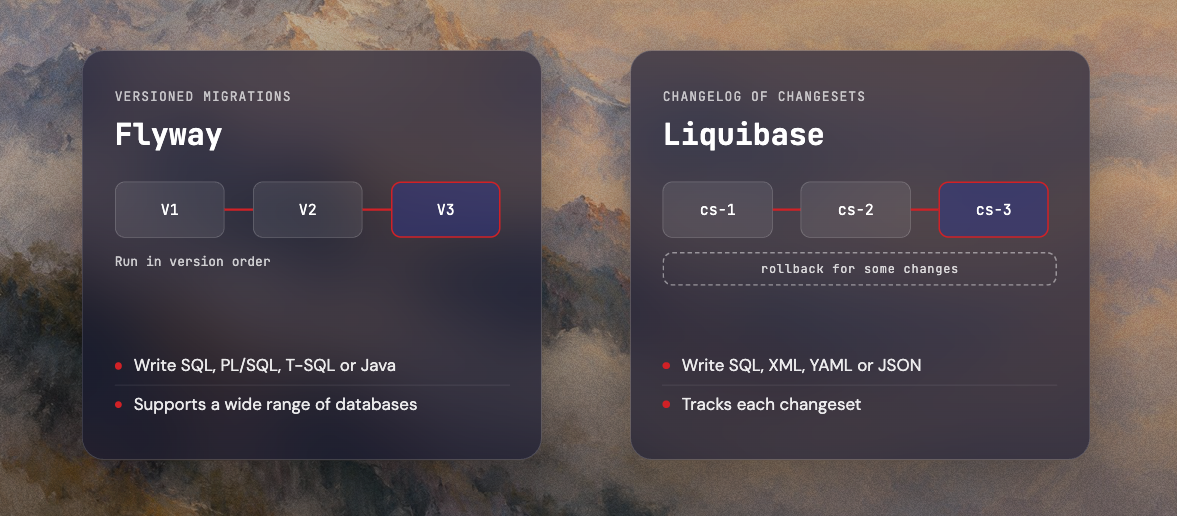
Two widely used DevOps database automation tools are:
- Flyway, from Redgate, which applies versioned migrations written in SQL (including database-specific dialects such as PL/SQL and T-SQL) or Java, and supports a wide range of databases (Flyway documentation).
- Liquibase, which tracks changes in a changelog of individual changesets written in SQL, XML, YAML or JSON, and can generate rollback statements for some change types.
Database automation needs extra care because some data changes are difficult or impossible to reverse. Dropping a column deletes its data. Production migrations should run with safeguards: a tested backup, a reviewed migration, often a manual approval and a plan for what to do if it fails partway. Automating the execution is valuable; automating it without those safeguards is risky.
Best DevOps workflow tools
This is an overview, not a ranking. The right DevOps workflow automation tools depend on your existing stack, cloud provider, team expertise, compliance requirements, deployment model, infrastructure and scale.
For a deeper comparison, see our guide to DevOps automation tools.
Sample workflow: a CI/CD pipeline example
Here is how a typical web application might move from commit to production. Your pipeline will differ; the point is the flow, not one universal architecture.
- Developer pushes code. A developer commits a change to a branch and opens a pull request.
- Pipeline starts automatically. A webhook or repository event triggers the CI pipeline; no one has to start it.
- Build. The application is compiled or packaged, with dependencies cached to save time.
- Automated tests run. Unit tests, integration tests, static analysis and security checks (dependency and secrets scanning) run, in parallel where possible. A failure blocks the merge.
- Create an artifact. After merge, the pipeline produces a versioned artifact or container image and stores it in a registry. This exact artifact is used in every later step.
- Provision or update infrastructure. If the change needs infrastructure updates, the pipeline plans and applies the Infrastructure as Code changes, with the plan shown for review.
- Deploy to staging. The artifact is deployed to a staging environment that mirrors production, and any database migrations run against staging first.
- Run validation. Smoke tests, integration tests and health checks confirm the release works in staging.
- Production approval. Where risk or compliance requires it, a person reviews the results and approves the production deployment.
- Deploy to production. The pipeline deploys using a rolling, blue-green or canary strategy.
- Monitor. The pipeline and monitoring tools watch error rate, latency, availability, logs and infrastructure health during and after the rollout.
- Roll back or continue. If health checks fail, the pipeline triggers a rollback or incident workflow. If everything is healthy, the rollout completes and the team is notified.
Real-world example: an automated configuration workflow at Intelitrex
Not every automated workflow ships application code. Intelitrex, a managed network monitoring provider and a Codesmith client, runs a workflow that ships monitoring configuration. Its platform is built on Naemon, an open-source monitoring engine forked from Nagios, with a separate, isolated monitoring instance for each customer, spread across several monitoring servers.
The workflow maps neatly onto the stages above:
Two design choices are worth copying. First, the servers pull their configuration rather than having it pushed to them, the same idea behind GitOps, so each server fetches the latest configuration itself instead of depending on a central system to reach every server. Second, each customer's instance is isolated, so a change for one customer cannot affect another.
As Intelitrex's infrastructure and DevOps partner, Codesmith looks after this pipeline end to end: the scheduled job, the publish step and the sync to the monitoring servers, along with the day-to-day operational work that keeps it healthy. An automated workflow still needs an owner. Jobs fail, dependencies change and servers need patching, and someone has to notice and fix those problems before customers do.
Best practices for DevOps workflow automation
1. Treat the pipeline as code
Pipeline definitions should live in the repository, be version-controlled, reviewed in pull requests, reproducible and documented. If the pipeline breaks, you can see what changed and when.
2. Keep pipelines fast
Slow pipelines push developers to batch changes and switch context while they wait. Run tests in parallel, cache dependencies and build layers, keep builds efficient and run each test at the stage where it gives the most value. Don't drop essential tests just to make the pipeline faster.
3. Use approval gates where risk justifies them
Production deployments may need human approval depending on risk, compliance and business impact. Automation and approval are not opposites: the pipeline prepares everything, and a person makes the final call.
4. Manage secrets properly
Never hardcode credentials in source code, pipeline configuration or infrastructure repositories. Use your CI platform's secret storage or a dedicated secret manager, scope secrets to the jobs that need them and rotate them regularly.
5. Build observability into the workflow
Connect monitoring to the deployment process so the pipeline knows whether a release is healthy, not just whether the deploy command succeeded.
6. Make rollbacks practical
Test rollback procedures instead of assuming they work. Keep versioned artifacts, use immutable builds where appropriate, keep a deployment history and plan database changes so code can roll back without breaking the schema.
7. Keep environments consistent
If staging is configured differently from production, staging tests prove little. Define environments with infrastructure automation so they are built the same way.
8. Automate the right things
Don't automate a process just because you can. Prioritize tasks that are repetitive, predictable, time-consuming, error-prone and frequent.
Common DevOps workflow automation mistakes
- Automating a broken process: fix the process first; automation makes a bad process fail faster.
- Creating an overly complicated pipeline: more stages and tools do not make a better pipeline. Every step should earn its place.
- Running every test at every stage: be intentional about which tests run where, or pipelines become slow without being safer.
- Ignoring database changes: application deployments and schema changes must be planned together.
- Hardcoding secrets: never store credentials in repositories or pipeline definitions.
- No rollback strategy: every production deployment needs a way back, or a clear roll-forward plan.
- No post-deployment monitoring: a successful deployment is not the same as a healthy application.
- Excessive manual handoffs: if work still waits for someone to press a button between stages, the workflow isn't really automated.
Conclusion: build a flow, not a tool collection
A good DevOps workflow is not a collection of tools. It is a connected system that moves software changes from commit → build → test → release → deploy → monitor, with the right automation, visibility and controls at each stage.
Don't try to automate everything at once. Find your biggest delivery bottleneck, whether that is waiting for builds, manual deployments, untested database changes or no post-deployment monitoring, and automate that first. DevOps workflow automation pays off one removed handoff at a time.
For the broader picture, read our guide to DevOps automation. If you want help designing or improving your delivery pipeline, Codesmith offers CI/CD automation consulting as part of its DevOps automation services.
FAQs on DevOps Workflow Automation
What is a DevOps workflow?
A DevOps workflow is the sequence of activities a team uses to plan, write, build, test, release, deploy and operate software, usually summarized as plan, code, build, test, release, deploy and monitor, with feedback from production informing the next round of work.
What is DevOps workflow automation?
DevOps workflow automation uses pipelines, tools and scripts to connect each stage of software delivery, from commit through build, test, release, deployment and monitoring, so changes move to production consistently with minimal manual handoffs. People still approve high-risk steps; automation handles the repeatable work.
What is the difference between CI and CD?
CI (continuous integration) is integrating code changes frequently and validating each one with automated builds and tests. CD covers what happens next. Continuous delivery keeps every validated change ready to release, usually with a manual approval for production. Continuous deployment releases every validated change to production automatically.
What tools are used for DevOps workflow automation?
- CI/CD: GitHub Actions, GitLab CI/CD, Jenkins
- Source control: GitHub, GitLab, Bitbucket
- Containers and orchestration: Docker, Kubernetes
- Infrastructure as code: Terraform, Pulumi, CloudFormation
- Database migrations: Liquibase, Flyway
- Observability: Prometheus, Grafana, Datadog
- Security: Snyk, Trivy
How long does it take to automate a DevOps workflow?
It depends on your existing infrastructure, the number of applications, deployment complexity, how much testing already exists, current tooling, security requirements and team experience. A single service with good tests can be automated far faster than a large estate of legacy applications. Start with one pipeline and expand from there.
Can the entire DevOps workflow be automated?
Not entirely, and usually it shouldn't be. Builds, tests, scans and deployments automate well. Planning, high-risk production approvals, ambiguous incidents and irreversible database changes benefit from human judgment.
What is the difference between DevOps automation and CI/CD?
CI/CD is a major part of DevOps automation focused on building, testing and delivering code. DevOps automation is broader, also covering infrastructure provisioning, configuration, security, monitoring and incident response.
How do database migrations fit into CI/CD?
Migrations are version-controlled alongside application code and run by the pipeline, first against test and staging databases, then production. Because some data changes can't be reversed, production migrations need extra safeguards: backups, review, backward-compatible changes and often manual approval.


